What PKCE protects
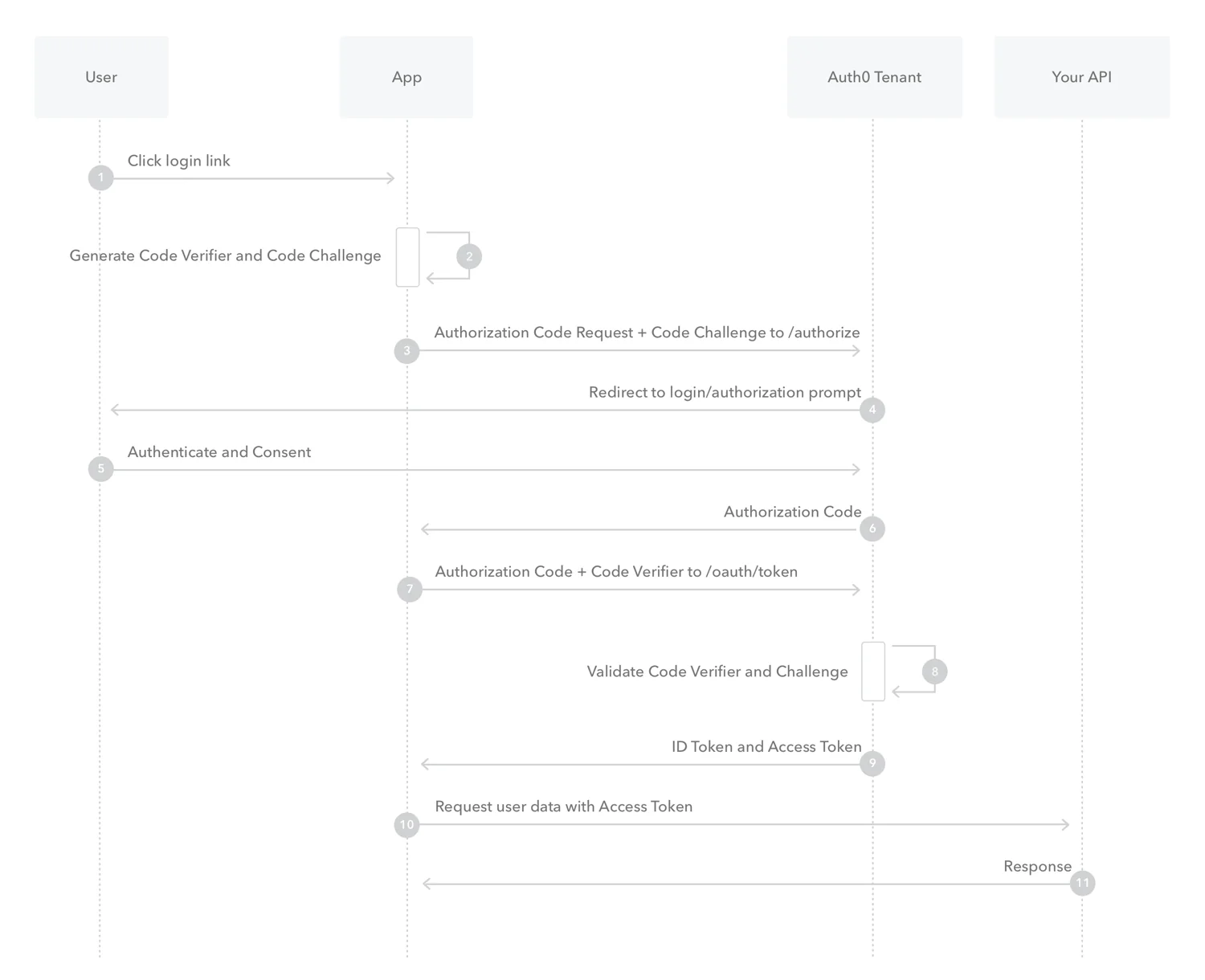
JavaScript shipped to a browser cannot keep a fixed client secret private. Authorization Code with PKCE strengthens the connection between initiating login and exchanging an authorization code. The client generates a random verifier and sends a derived challenge during authorization. It later presents the verifier when exchanging the code. Intercepting the code alone is therefore insufficient for that exchange. This is an important control, but it is only one part of a secure login implementation.
Separate the concepts. OAuth concerns resource access; authentication commonly uses OpenID Connect alongside it. PKCE binds the code exchange to its initiator, state correlates the response with a login attempt and an OIDC nonce participates in ID-token validation. The example generates only verifier, challenge and state. It is not a complete login client and should not become one by simply appending an authorization URL and treating the result as production-ready.
Treat login as an end-to-end flow
Use a maintained identity-provider SDK for the complete flow and register exact redirect URIs. Do not allow arbitrary user-supplied callback addresses. HTTPS, the expected issuer and the client configuration are part of the contract. Store the verifier for its specific attempt and remove it after use. Multiple tabs can overwrite a single shared attempt value, so handle concurrent logins, cancellation and expired attempts deliberately rather than assuming a single linear path.
At callback, handle errors and validate state before continuing through the SDK. APIs must validate access tokens against the intended issuer, audience and lifetime. Do not substitute an ID token for an API access token. PKCE does not prevent hostile JavaScript in the application, so XSS defenses, content policies and token-storage choices remain relevant. Avoid sending tokens and verifiers to logs, error trackers or analytics as troubleshooting data.
Our suggested test matrix covers success, incorrect state, repeated callbacks, expired codes, network failure, logout and two-tab login. Failure should return the application to a clear state rather than leave an ambiguous partial session. Test page access separately from permission to perform an operation; viewing administration is not authority to change roles. For support, retain a correlation ID and failure category instead of copying sensitive authorization payloads.
Code example and verification
This educational example demonstrates the implementation path. Check the stated runtime and prerequisites in a test environment; the notes explain what remains before production use.
const toBase64Url = bytes =>
  btoa(String.fromCharCode(...bytes))
    .replace(/\+/g, '-').replace(/\//g, '_').replace(/=+$/, '');

const verifier = toBase64Url(crypto.getRandomValues(new Uint8Array(32)));
const digest = await crypto.subtle.digest(
  'SHA-256', new TextEncoder().encode(verifier)
);
const challenge = toBase64Url(new Uint8Array(digest));
const state = toBase64Url(crypto.getRandomValues(new Uint8Array(16)));

// Inspect only public shape information, never the secret verifier.
console.log({ verifierLength: verifier.length,
  challengeLength: challenge.length, method: 'S256', stateLength: state.length });
Both verifier and challenge should be 43 characters. The example logs only their lengths, not the verifier itself. Use an SDK for authorization, state storage, callbacks and code exchange. This snippet intentionally creates no session and receives no token.
Test more than successful login
Validate the flow with a test application and accounts with distinct roles. Then address session lifetime, refresh behavior and multifactor authentication as separate design decisions. Document the issuer, callback paths, API access boundaries and incident response. A good result is a reliable and supportable login experience. Merely including a PKCE parameter in the authorization request is not proof that the entire system is secure.
Implementation checklist
- Run the demo on HTTPS or localhost with Web Crypto support.
- Use a maintained SDK for complete login; never embed a browser client secret.
- Validate state, OIDC nonce, redirect URI and tokens through the documented SDK flow.
- Test repeated callbacks, concurrent tabs, cancellation and logout.
Practical explanations and recommendations are Liyan Knowledge editorial analysis.Sources: Auth0 — Authorization Code with PKCE · RFC 7636 — PKCE · RFC 9700 — OAuth security best current practice
This Liyan Knowledge article is an editorial synthesis based on the original source.View original source