Inventory the application before writing a policy
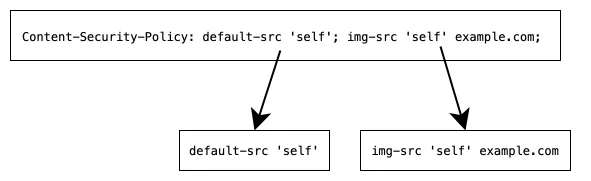
A website loads scripts, images, fonts and API requests, sometimes from several origins. Enabling a restrictive policy without understanding these paths can break sign-in or contact forms. CSP constrains allowed browser behavior. It complements secure output handling and server validation rather than replacing them.
List sensitive flows and explain why each external source is needed. Local image hosting can reduce network dependencies and simplify img-src. Do not add broad domain allowances simply to silence console messages. Every permission should have an owner and a reason.
Observe and fix legitimate violations
Begin with Content-Security-Policy-Report-Only. This observes violations without enforcing that particular policy. The sample intentionally has no central reporting endpoint; inspect the browser console during testing. Central collection needs a separate endpoint and data-minimization decisions. Check whether proxies or the application add other policies as well.
Inline scripts may need external files, hashes or correctly generated nonces. A nonce must be unpredictable per response and match the relevant markup; a constant in a server configuration is unsuitable. A self-only script rule also needs scrutiny when the same origin hosts attacker-controlled content. Treat the example as an initial observation policy.
A violation is not automatically an attack. Browser extensions, analytics and legacy routes can generate reports. Group findings by page, resource type and deployment version. Exercise form submissions and API calls, not only the home page. Also inspect error and cached responses for the intended headers.
Code example and verification
The notes state the prerequisites and expected outcome. Run the example in a test environment, then adapt it to your project’s data and constraints.
1. Nginx; observation-only policy example
# Place inside the intended test server {} block.
add_header Content-Security-Policy-Report-Only "default-src 'self'; script-src 'self'; style-src 'self'; img-src 'self'; font-src 'self'; connect-src 'self'; object-src 'none'; base-uri 'self'; form-action 'self'; frame-ancestors 'self'" always;
Validate the test configuration with nginx -t. Inspect the response header in Network and violations in Console. Report-Only does not block resources. Inline styles, external services and frames need application-specific review and carefully scoped allowances.
2. Generate a fresh nonce for every response
Run python nonce_server.py to inspect the relationship between response header and markup. secrets generates the nonce and the same value appears in that response’s header and script. The page has no external dependencies.
# nonce_server.py; localhost demonstration.
from http.server import BaseHTTPRequestHandler, HTTPServer
from secrets import token_urlsafe

ENFORCE = False

class Handler(BaseHTTPRequestHandler):
    def do_GET(self):
        nonce = token_urlsafe(24)
        policy = (
            "default-src 'none'; "
            f"script-src 'nonce-{nonce}'; "
            "object-src 'none'; base-uri 'none'; "
            "form-action 'self'; frame-ancestors 'none'"
        )
        body = (
            '<!doctype html><meta charset="utf-8"><title>Nonce demo</title>'
            '<h1>CSP nonce exercise</h1><output>Waiting</output>'
            f'<script nonce="{nonce}">'
            'document.querySelector("output").textContent="Script executed";'
            '</script>'
        ).encode()
        self.send_response(200)
        header = "Content-Security-Policy" if ENFORCE else "Content-Security-Policy-Report-Only"
        self.send_header(header, policy)
        self.send_header("Cache-Control", "no-store")
        self.send_header("Content-Type", "text/html; charset=utf-8")
        self.send_header("Content-Length", str(len(body)))
        self.end_headers()
        self.wfile.write(body)

if __name__ == "__main__":
    HTTPServer(("127.0.0.1", 8767), Handler).serve_forever()
Open http://127.0.0.1:8767 and expect Script executed. Reloading changes the nonce. no-store prevents reuse in this demonstration; cached HTML requires an explicit strategy that keeps its body and policy synchronized.
3. Verify nonce matching and per-response rotation
A correct header alone is insufficient; the script attribute must match it. This check fetches two responses, verifies each header/body pair and then checks rotation across responses.
# Run while nonce_server.py is listening.
import re
import urllib.request

def snapshot():
    with urllib.request.urlopen("http://127.0.0.1:8767", timeout=2) as response:
        policy = response.headers.get("Content-Security-Policy-Report-Only")
        if policy is None:
            policy = response.headers["Content-Security-Policy"]
        page = response.read().decode()
    header_nonce = re.search(r"'nonce-([^']+)'", policy).group(1)
    tag_nonce = re.search(r'<script nonce="([^"]+)"', page).group(1)
    assert header_nonce == tag_nonce
    return header_nonce

first, second = snapshot(), snapshot()
assert first != second
print("Matching, fresh nonces verified")
Expect Matching, fresh nonces verified. This is a textual contract check, not a browser enforcement test. Also exercise allowed execution and blocking of an unnonced script in an enforcing browser test.
4. Observe policy violations in a test environment
Install the listener in an already allowed script. Exercise Report-Only first, then ENFORCE=True in the local test server. disposition distinguishes observation from enforcement.
// Put this in an already permitted script before the test interaction.
window.addEventListener("securitypolicyviolation", event => {
  console.table({
    directive: event.effectiveDirective,
    resource: event.blockedURI,
    disposition: event.disposition,
  });
});

// In nonce_server.py, switch ENFORCE to True only in the test environment.
// Reload and verify the response uses Content-Security-Policy.
// An inline script without the matching nonce must then be blocked.
Before broad enforcement, test sign-in, forms, uploads, errors and external services. blockedURI can contain path information; this example writes only to the local console. Keep the tested policy version and rollback path with the report.
Define acceptance before enforcement
After legitimate violations are resolved, decide on enforcement with a rollback path. Start in a test environment and a bounded deployment scope. Record tested flows and remaining exceptions. A useful policy is precise and maintainable; a long header or a temporarily quiet console is not sufficient evidence.
Implementation checklist
- Inventory resources and sensitive flows.
- Start with Report-Only in testing.
- Do not deploy a static nonce.
- Verify critical interactions before enforcement.
Reference
Editorial guidance: Liyan Knowledge.