Express a standard interaction in HTML
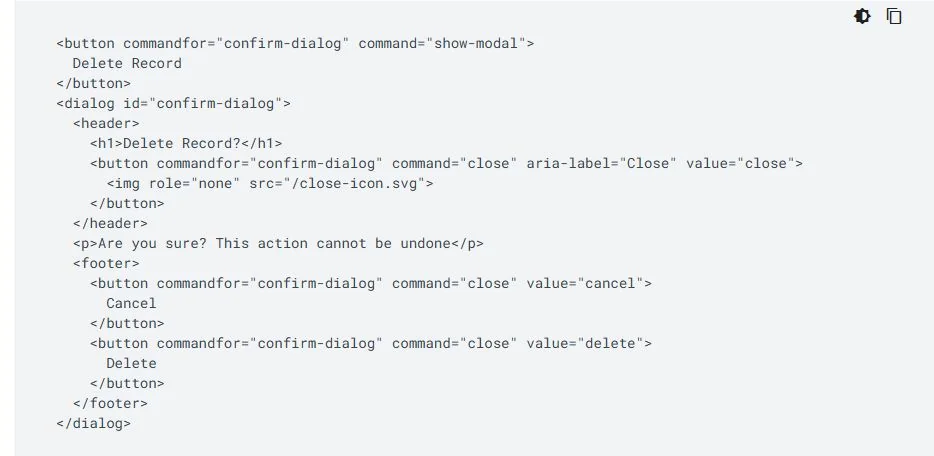
Opening a help dialog often requires finding a button and wiring a click handler to showModal. The command and commandfor attributes can express that relationship in HTML for supported actions. This can reduce repetitive code, but target-browser behavior still needs verification.
The example points commandfor at the dialog ID and uses show-modal. The opening button has type="button" to avoid accidental submission if moved into a form. aria-labelledby associates the title, and a method="dialog" form supplies the close action. These details make the small component’s behavior explicit.
Feature detection and a deliberate fallback
Do not infer support merely because the markup looks correct. Detect commandForElement on HTMLButtonElement before adding the fallback handler. Installing both paths can duplicate behavior. This fallback still requires native dialog and showModal support; much older browsers need a separately designed content path.
Native dialog provides useful modal and focus behavior, but the actual content requires testing. Tab through controls, close with Escape and verify focus returns to the opener. Check long content and zoom on mobile. An obscured close button is still a usability defect regardless of the API.
Sometimes inline content or details is a better choice than a modal. Use interruption intentionally. A dialog for a sensitive operation would need pending, failure and duplicate-submit behavior beyond this sample. This example is read-only help and makes no network request.
Code example and verification
The notes state the prerequisites and expected outcome. Run the example in a test environment, then adapt it to your project’s data and constraints.
1. Standalone HTML; modern browser with a small fallback
<!doctype html>
<html lang="en">
<meta charset="utf-8">
<meta name="viewport" content="width=device-width,initial-scale=1">
<title>Dialog command demo</title>
<button id="open-help" type="button"
        commandfor="help" command="show-modal">Open help</button>
<dialog id="help" aria-labelledby="help-title">
  <h2 id="help-title">Saving a draft</h2>
  <p>Save your draft before leaving the page.</p>
  <form method="dialog"><button>Close</button></form>
</dialog>
<script>
if (!("commandForElement" in HTMLButtonElement.prototype)) {
  document.querySelector("#open-help").addEventListener("click", () => {
    document.querySelector("#help").showModal();
  });
}
</script>
</html>
Open in the target browser. The button should open the dialog; Close or Escape should dismiss it. The fallback requires showModal. The inline script would need an allowed external file or matching nonce under a restrictive CSP.
2. A labeled dialog form with an explicit result
This version distinguishes form outcomes. Cancel must work with an empty required field, so it uses formnovalidate. method=dialog transfers the submit button’s value to returnValue without sending a network request.
<!-- dialog-demo.html; place beside dialog-ui.js. -->
<!doctype html>
<html lang="en">
<meta charset="utf-8">
<meta name="viewport" content="width=device-width,initial-scale=1">
<title>Command dialog exercise</title>
<button id="open" type="button" commandfor="editor" command="show-modal">
  Open form
</button>
<dialog id="editor" aria-labelledby="editor-title">
  <h1 id="editor-title">Choose a display name</h1>
  <form method="dialog">
    <label for="name">Display name</label>
    <input id="name" required maxlength="80">
    <button value="cancel" formnovalidate>Cancel</button>
    <button value="save">Use this name</button>
  </form>
</dialog>
<p id="result" role="status" aria-live="polite">No selection</p>
<script type="module" src="./dialog-ui.js"></script>
</html>
With the next module, the selected name appears outside the dialog. Page title and dialog title serve different roles. Keep an actual input label rather than relying on a placeholder that disappears while typing.
3. Fallback, cancellation, Escape and selection handling
Serve both files with python -m http.server 8000. With native commandfor, the handler only resets the previous outcome and does not call showModal again. Without commandfor but with dialog support, it provides the fallback.
// dialog-ui.js
const opener = document.querySelector("#open");
const dialog = document.querySelector("#editor");
const name = document.querySelector("#name");
const result = document.querySelector("#result");
const nativeCommand = "commandForElement" in HTMLButtonElement.prototype;

opener.addEventListener("click", () => {
  dialog.returnValue = "cancel";
  if (!nativeCommand) dialog.showModal();
});
dialog.addEventListener("close", () => {
  result.textContent = dialog.returnValue === "save"
    ? "Selected: " + name.value
    : "Cancelled";
});
Select a name, reopen and press Escape: expect Cancelled rather than the previous save outcome. textContent keeps the name as text. The example does not upload or durably save it; that would need its own success and failure handling.
4. Browser tests for dismissal, focus and form selection
Install @playwright/test and its required browser in a separate test folder, keep the local server running and execute npx playwright test dialog.spec.js. The tests address accessible control names, which should evolve with the product’s language.
// dialog.spec.js; @playwright/test installed in a separate test folder.
import { test, expect } from "@playwright/test";

test("Escape cancels and restores focus", async ({ page }) => {
  await page.goto("http://127.0.0.1:8000/dialog-demo.html");
  const opener = page.getByRole("button", { name: "Open form" });
  await opener.click();
  await expect(page.getByRole("dialog")).toBeVisible();
  await page.keyboard.press("Escape");
  await expect(page.getByRole("dialog")).toBeHidden();
  await expect(opener).toBeFocused();
  await expect(page.getByRole("status")).toHaveText("Cancelled");
});

test("validated form returns the chosen name", async ({ page }) => {
  await page.goto("http://127.0.0.1:8000/dialog-demo.html");
  await page.getByRole("button", { name: "Open form" }).click();
  await page.getByLabel("Display name", { exact: true }).fill("Liyan");
  await page.getByRole("button", { name: "Use this name" }).click();
  await expect(page.getByRole("status")).toHaveText("Selected: Liyan");
});
Both tests should pass. Also cover target browsers, the fallback path, Tab navigation, long text and zoom. Passing in one browser does not establish universal support for a newer feature.
Verify the complete interaction
Record target browsers and exercise both native and fallback paths. Keep keyboard checks beside touch and mouse checks. For students, the exercise demonstrates progressive enhancement: express a standard relationship in HTML and add JavaScript only for a defined need.
Implementation checklist
- Match the target ID exactly.
- Install the handler only when native support is absent.
- Test Tab, Escape and focus return.
- Remember that the fallback itself requires dialog support.
References
Editorial guidance: Liyan Knowledge.