
Local persistence is one part of offline support
A brief connection failure should not erase a student’s long answer or a support note. IndexedDB can persist structured drafts before a server upload. Local browser data is still vulnerable to clearing, quota limits and shared-device access. Distinguish saved on this device from submitted to the server in the interface.
Define the record before the database. Form ID, user ID, editing time and document version help identify the right draft. The example stores a single fictional document. A real shared-device application needs user-scoped keys and an explicit logout cleanup policy. Do not put secrets into local storage merely because the API is convenient.
Use explicit transactions and schema versions
Requests execute within transactions. A successful put request is not the same as a completed transaction, so announce persistence after the complete event. The helper resolves its promise there and rejects on open failure or transaction abort. Keep the user’s current in-memory text available when persistence fails instead of clearing the form.
Schema upgrades use the database version and upgradeneeded. An older open connection can block an upgrade. Close obsolete connections on versionchange and provide useful blocked-state feedback in the product. This small helper closes its own connection after each transaction. Migration tests must include an actual older schema rather than only a fresh database.
For editing, consider bounded debouncing rather than writing on every keystroke or relying entirely on page exit. Reconnection introduces another problem: retrying uploads and reconciling another device’s changes. Stable record IDs and expected server versions can support a deliberate conflict policy. IndexedDB does not provide that policy automatically.
Code example and verification
The notes state the prerequisites and expected outcome. Run the example in a test environment, then adapt it to your project’s data and constraints.
1. JavaScript on a localhost or HTTPS test page
function saveDraft(record) {
  return new Promise((resolve, reject) => {
    const open = indexedDB.open("liyan-drafts-demo", 1);
    open.onupgradeneeded = () => {
      open.result.createObjectStore("drafts", { keyPath: "id" });
    };
    open.onerror = () => reject(open.error);
    open.onsuccess = () => {
      const db = open.result;
      db.onversionchange = () => db.close();
      const tx = db.transaction("drafts", "readwrite");
      tx.oncomplete = () => { db.close(); resolve(record.id); };
      tx.onabort = () => { db.close(); reject(tx.error); };
      tx.objectStore("drafts").put(record);
    };
  });
}

saveDraft({ id: "lesson-1", text: "My draft", updatedAt: Date.now() })
  .then(id => console.log("Saved:", id))
  .catch(error => console.error("Draft was not saved:", error));
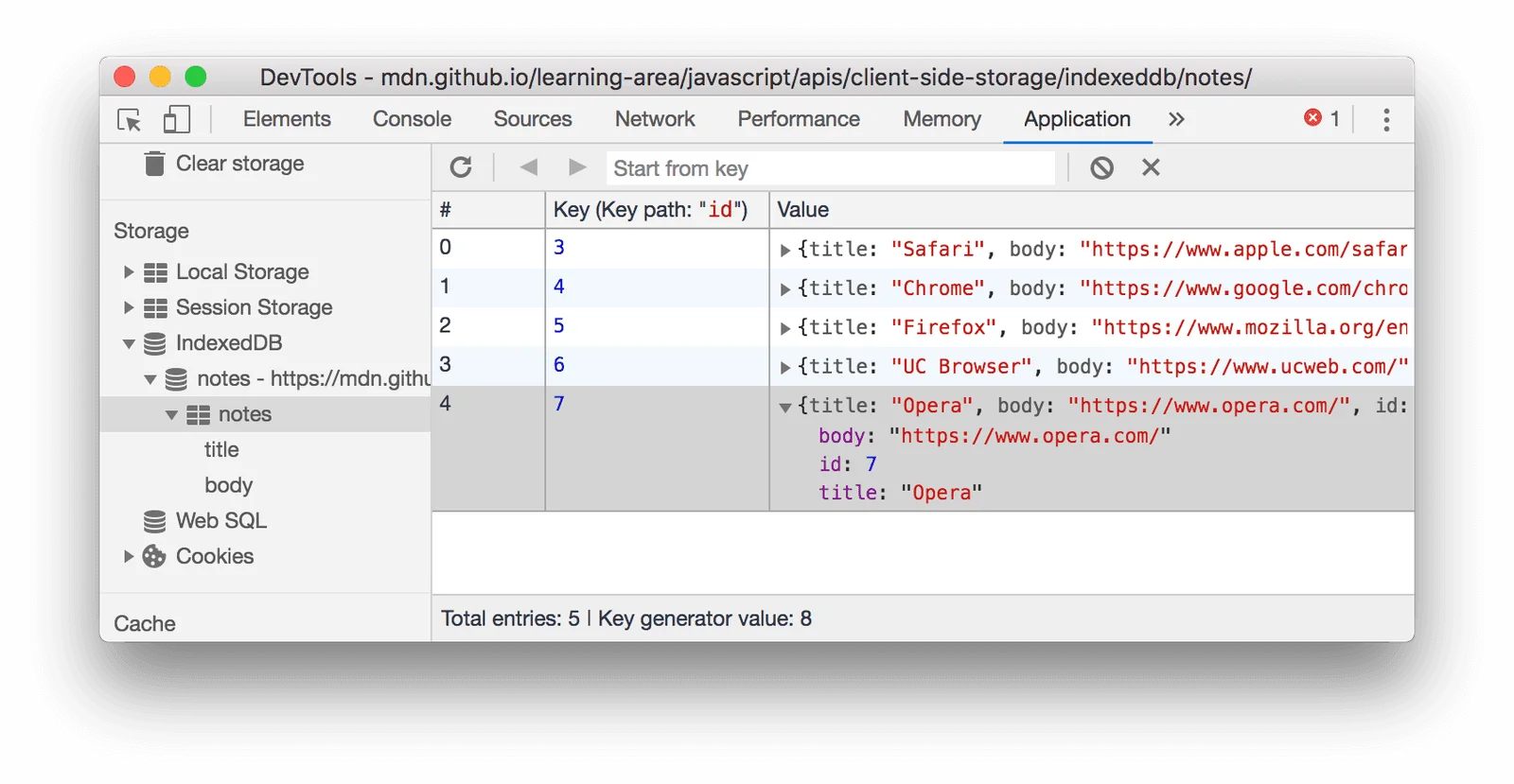
Run in the console of a test page. Expect Saved: lesson-1 after completion and inspect the record in Application → IndexedDB. This fictional record contains no private data. Form wiring, reads and server synchronization are separate work.
2. A draft module with save, load and delete
Save this fuller version as draft-store.js. It uses a different teaching database from the initial helper. Connections close after transactions, completion determines persistence success and a blocked upgrade reaches the caller.
// Save as draft-store.js.
function openDatabase() {
  return new Promise((resolve, reject) => {
    const request = indexedDB.open("liyan-drafts-v2-demo", 1);
    let abandoned = false;
    request.onupgradeneeded = () => {
      request.result.createObjectStore("drafts", { keyPath: "id" });
    };
    request.onblocked = () => {
      abandoned = true;
      reject(new Error("Close older draft tabs and retry"));
    };
    request.onerror = () => reject(request.error);
    request.onsuccess = () => {
      const db = request.result;
      db.onversionchange = () => db.close();
      if (abandoned) db.close();
      else resolve(db);
    };
  });
}

async function transaction(mode, operation) {
  const db = await openDatabase();
  return new Promise((resolve, reject) => {
    let tx;
    try {
      tx = db.transaction("drafts", mode);
      const request = operation(tx.objectStore("drafts"));
      tx.oncomplete = () => { db.close(); resolve(request.result); };
      tx.onabort = () => { db.close(); reject(tx.error || new Error("Aborted")); };
    } catch (error) {
      db.close();
      reject(error);
    }
  });
}

export function saveDraft(record) {
  if (!record.id || typeof record.text !== "string") {
    return Promise.reject(new TypeError("id and text are required"));
  }
  return transaction("readwrite", store => store.put(record));
}
export function loadDraft(id) {
  return transaction("readonly", store => store.get(id));
}
export function deleteDraft(id) {
  return transaction("readwrite", store => store.delete(id));
}
The next steps import all three operations. The example key is fictional; a real application should scope it to the user and document and implement logout cleanup accordingly. Test recovery after completed transactions on target browsers.
3. The form and its persistence status
Place the files together and serve the folder with python -m http.server 8000. Avoid opening modules through file://. The live status communicates persistence changes to assistive technology as well.
<!-- Save as draft.html beside draft-store.js and draft-ui.js. -->
<!doctype html>
<html lang="en">
<meta charset="utf-8">
<meta name="viewport" content="width=device-width,initial-scale=1">
<title>Offline draft exercise</title>
<label for="draft">Lesson answer</label>
<textarea id="draft" rows="8"></textarea>
<p id="status" role="status" aria-live="polite">Loading draft…</p>
<button id="save" type="button">Save now</button>
<button id="remove" type="button">Delete local draft</button>
<script type="module" src="./draft-ui.js"></script>
</html>
With the next module added, the form restores its saved draft. Local persistence does not require internet connectivity, but fully offline page loading needs separate application-resource caching. Keep those acceptance criteria distinct.
4. Wire editing, debounced saving and recovery
Snapshot text when scheduling persistence and serialize writes. The revision counter prevents completion of an older write from marking newer edits as saved. Editing is disabled during initial recovery so a late read cannot overwrite newly typed text.
// Save as draft-ui.js.
import { saveDraft, loadDraft, deleteDraft } from "./draft-store.js";

const input = document.querySelector("#draft");
const status = document.querySelector("#status");
const id = "demo-user:lesson-1";
let timer;
let revision = 0;
let writes = Promise.resolve();

async function persist() {
  const version = revision;
  const text = input.value;
  const write = writes.then(() => saveDraft({ id, text, updatedAt: Date.now() }));
  writes = write.catch(() => {});
  try {
    await write;
    if (version === revision) status.textContent = "Saved on this device";
  } catch (error) {
    status.textContent = "Not saved: " + error.message;
  }
}
input.disabled = true;
try {
  const draft = await loadDraft(id);
  if (draft) input.value = draft.text;
  status.textContent = draft ? "Draft restored" : "No local draft yet";
} catch (error) {
  status.textContent = "Recovery failed: " + error.message;
}
input.disabled = false;

input.addEventListener("input", () => {
  revision++;
  status.textContent = "Unsaved changes";
  clearTimeout(timer);
  timer = setTimeout(persist, 400);
});
document.querySelector("#save").onclick = () => {
  clearTimeout(timer);
  persist();
};
document.querySelector("#remove").onclick = async () => {
  clearTimeout(timer);
  const deletingRevision = ++revision;
  const removal = writes.then(() => deleteDraft(id));
  writes = removal.catch(() => {});
  try {
    await removal;
    if (deletingRevision === revision) {
      input.value = "";
      status.textContent = "Local draft deleted";
    }
  } catch (error) {
    status.textContent = "Delete failed: " + error.message;
  }
};
Type, wait for saved status and reload: the text should return. Delete and reload should leave no draft. Closing before the 400ms debounce completes can lose the latest edit; Save now provides an explicit persistence path. Choose the real product interval deliberately.
5. Optional server synchronization with conflict detection
Use this after loading the current server version. If-Match prevents lost updates only when the server atomically enforces the precondition with its write. Authentication and CSRF validation remain explicit server responsibilities.
// The server must implement this contract; the local demo has no such endpoint.
export async function uploadDraft({ url, text, serverEtag, csrfToken }) {
  if (!serverEtag) throw new Error("Load the current server version first");
  const response = await fetch(url, {
    method: "PUT",
    credentials: "same-origin",
    headers: {
      "Content-Type": "application/json",
      "If-Match": serverEtag,
      "X-CSRF-Token": csrfToken,
    },
    body: JSON.stringify({ text }),
  });
  if (response.status === 412) {
    return { status: "conflict", localText: text };
  }
  if (!response.ok) throw new Error("Upload failed: " + response.status);
  return { status: "uploaded", serverEtag: response.headers.get("ETag") };
}
For 412, retain local text and offer a conflict-resolution path. Keep drafts on network failure too. Display uploaded only after server success; do not confuse local persistence with remote acceptance.
Design recovery and conflict handling
Test the writer’s experience: edit, disconnect, reload and recover the draft. Also test quota failure, an outdated tab and a conflicting server edit. This example persists data only; offline loading of the application itself needs a separate resource-caching strategy. Making that boundary visible produces a stronger student project and a clearer implementation plan.
Implementation checklist
- Confirm persistence after transaction completion.
- Scope records and cleanup to the user.
- Test upgrades with an older tab open.
- Separate local drafts, uploads and application caching.
References
Editorial guidance: Liyan Knowledge.