A lightweight search prototype
A small knowledge base or offline teaching tool may not need a separate search service. SQLite FTS5 offers full-text indexing alongside local data. A single-file deployment can simplify a prototype, provided its write concurrency and storage requirements fit the application. This demonstration uses an in-memory database so it cannot overwrite an existing project file.
Persian retrieval needs deliberate text preparation. Arabic and Persian variants of yeh and kaf can differ even when readers consider them equivalent. Half-spaces and repeated whitespace can also affect matching. The example normalizes two letter variants and turns half-spaces into spaces. Preserve the original text separately and test whether these transformations improve your own queries rather than treating them as a universal linguistic solution.
Normalize carefully before tuning ranking
The default unicode61 tokenizer is not a Persian stemming or semantic engine. Normalizing letters will not connect unrelated spellings for synonyms such as payment and settlement. Collect representative failures before adding a synonym list or another retrieval system. A student project can start with document titles and short bodies, then document which query classes remain unsupported.
The example uses SQL parameters, but parameter binding does not disable FTS5 query syntax. A user’s search term can still contain MATCH operators. For a simple phrase interface, the helper quotes the phrase and doubles embedded quotation marks. An advanced search interface instead needs a defined query grammar and understandable validation errors. Handle an empty search before issuing the query.
BM25 supports relevance ordering; smaller scores sort first here. Two sample documents only prove the mechanics. Build a query set with expected results, spelling variations, half-spaces and intentionally absent answers. Check whether useful documents appear near the top and whether displayed titles help users choose. Escape any extracted text before inserting it into HTML.
Code example and verification
The notes state the prerequisites and expected outcome. Run the example in a test environment, then adapt it to your project’s data and constraints.
1. Python with an FTS5-enabled SQLite build
import sqlite3

def normalize(text):
    return " ".join(text.replace("ي", "ی").replace("ك", "ک")
                    .replace("\u200c", " ").split())

def phrase(text):
    return '"' + text.replace('"', '""') + '"'

db = sqlite3.connect(":memory:")
db.execute("CREATE VIRTUAL TABLE docs USING fts5(title, body)")
db.executemany("INSERT INTO docs VALUES (?, ?)", [
    ("پرداخت", normalize("راهنمای پرداخت اینترنتی")),
    ("ارسال", normalize("پیگیری ارسال سفارش")),
])
query = normalize("پرداخت")
if query:
    rows = db.execute(
        "SELECT title FROM docs WHERE docs MATCH ? "
        "ORDER BY bm25(docs) LIMIT 5", (phrase(query),)
    ).fetchall()
    print(rows)
Expect only the payment title. This example does not implement authorization or external-content synchronization. A no such module: fts5 error means this runtime lacks the required SQLite extension.
2. Keep the source table and FTS5 index synchronized
Run in an empty FTS5-enabled test database. An external-content index does not synchronize itself merely because the source table exists. Inserts, updates and deletes must maintain it.
CREATE TABLE source_docs(id INTEGER PRIMARY KEY, title TEXT, body TEXT);
CREATE VIRTUAL TABLE search_docs USING fts5(
    title, body, content='source_docs', content_rowid='id'
);
CREATE TRIGGER docs_insert AFTER INSERT ON source_docs BEGIN
    INSERT INTO search_docs(rowid,title,body)
    VALUES(new.id,new.title,new.body);
END;
CREATE TRIGGER docs_delete AFTER DELETE ON source_docs BEGIN
    INSERT INTO search_docs(search_docs,rowid,title,body)
    VALUES('delete',old.id,old.title,old.body);
END;
CREATE TRIGGER docs_update AFTER UPDATE ON source_docs BEGIN
    INSERT INTO search_docs(search_docs,rowid,title,body)
    VALUES('delete',old.id,old.title,old.body);
    INSERT INTO search_docs(rowid,title,body)
    VALUES(new.id,new.title,new.body);
END;
INSERT INTO source_docs VALUES(1,'Payment guide','refund policy');
SELECT rowid,title FROM search_docs WHERE search_docs MATCH 'refund';
UPDATE source_docs SET body='delivery policy' WHERE id=1;
SELECT count(*) FROM search_docs WHERE search_docs MATCH 'refund';
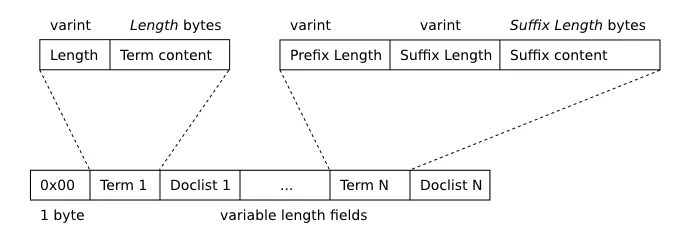
The initial query returns row 1; the final count must be zero after the update. Existing source data requires an index rebuild after setup. The cover illustrates an older SQLite FTS structure; it is not an FTS5 benchmark or exact on-disk layout.
3. A phrase-search function with empty-input handling
This standalone example creates its own in-memory database. A bounded limit and explicit phrase quoting define a simple search box rather than an advanced query-language interface.
import sqlite3

def normalize(value):
    return " ".join(value.replace("ي", "ی").replace("ك", "ک")
                    .replace("\u200c", " ").split())

def search(db, user_query):
    query = normalize(user_query)
    if not query:
        return []
    phrase = '"' + query.replace('"', '""') + '"'
    return db.execute(
        "SELECT title, body FROM docs WHERE docs MATCH ? "
        "ORDER BY bm25(docs) LIMIT ?", (phrase, 5)
    ).fetchall()

db = sqlite3.connect(":memory:")
db.execute("CREATE VIRTUAL TABLE docs USING fts5(title,body)")
db.execute("INSERT INTO docs VALUES(?,?)",
           ("پرداخت", normalize("راهنمای پرداخت اینترنتی")))
assert search(db, "  ") == []
assert search(db, "پرداخت")[0][0] == "پرداخت"
assert search(db, 'a "quoted" phrase') == []
print("Search checks passed")
db.close()
Expect Search checks passed. A real API should bound query length and result count on the server, and obtain tenant identity from verified authentication rather than a user-editable parameter.
4. Render results safely and test Persian normalization
Correct retrieval also needs safe display. This example inserts title and body as text and treats retrieved content as untrusted even when it comes from the application’s own database.
from html import escape
def normalize(value):
return " ".join(value.replace("ي", "ی").replace("ك", "ک")
.replace("\u200c", " ").split())
def result_card(title, body):
return "<article><h3>" + escape(title) + "</h3><p>" + escape(body) + "</p></article>"
assert normalize("كتاب") == normalize("کتاب")
assert normalize("می\u200cرود") == normalize("می رود")
markup = result_card("<script>unsafe</script>", "راهنمای پرداخت")
assert "<script>" not in markup
assert "<script>" in markup
print(markup)The first assertions document normalization and the next ones verify that document markup stays text. For highlighting, escape content before adding application-controlled markers; do not pass raw highlight output directly to innerHTML.
Know when to revisit the architecture
Revisit the design when write contention, distribution or authorization needs grow. Measure indexing and recovery costs before migrating. A useful educational deliverable includes fixtures, normalization rules and retrieval checks alongside its interface. That record makes later improvements assessable and prevents a successful-looking demonstration from being mistaken for validated search quality.
Implementation checklist
- Check FTS5 availability in the deployed runtime.
- Preserve originals beside normalized content.
- Treat SQL parameters and MATCH syntax separately.
- Evaluate Persian queries with expected results.
References
Aivan Knowledge also covers hybrid lexical and semantic search.
Editorial guidance: Liyan Knowledge.