
Locate the gateway that produced the error
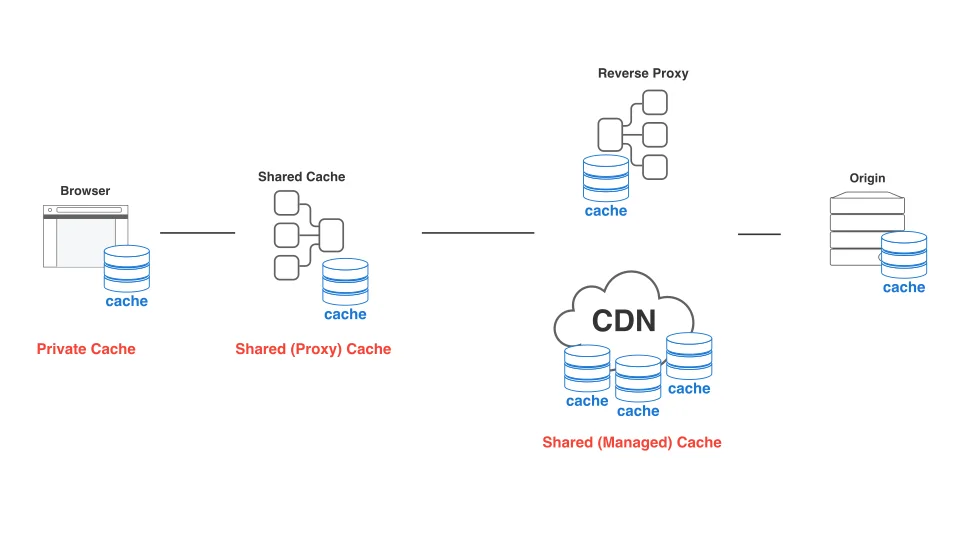
A 502 response says that a gateway did not obtain a valid upstream response. The status alone does not distinguish a stopped process, an incorrect port, a protocol mismatch or a broken connection. Before adjusting timeouts, draw the complete request path through any distribution network, proxy and application server. Identify the component producing the error so that the proposed change addresses the failing boundary rather than a different layer.
Probe the upstream from the same network environment as the proxy. A successful request from an administrator's laptop does not prove that a proxy container can reach the same destination. Loopback inside a container refers to that container. This example deliberately runs both processes on one test host. Moving it into containers requires corresponding changes to service names, internal ports and network policy rather than copying the loopback address unchanged.
Probe the upstream and correlate request evidence
Record a request identifier and upstream timing to correlate proxy events with application logs. A refused connection and a slow response header are different observations. A single timeout increase is not a diagnosis for both. The example keeps connection and read waits bounded and exposes their timing in access logs. Increasing waits without understanding the failure can retain more requests and connections while leaving the original application problem unresolved.
Start python upstream.py in a separate working directory. On a Linux test host with NGINX installed, validate the sample configuration first, then load that specific file by its absolute path. Its standard-output logging is intended for that environment. Ensure ports 8090 and 8091 are available. Run python diagnose.py to obtain separate gateway and direct-upstream observations. The tool performs requests only and does not restart processes or rewrite server configuration.
Run python -m unittest test_diagnose.py to exercise a real local upstream and the main classification decisions. After observing success, stop only the test upstream and collect another result. The checker reports availability from its own execution location; correlate that with logs from the same moment. These Python tests do not validate the NGINX binary or configuration installed on a production host, which require their own configuration and request checks.
Complete files to save
Save all four files together. The article explains execution and verification; no code is replaced with ellipses.
1. A small test upstream
File: upstream.py. Save every line under this filename.
from http.server import BaseHTTPRequestHandler, ThreadingHTTPServer


class Handler(BaseHTTPRequestHandler):
    def do_GET(self):
        body = b'upstream ready\n'
        self.send_response(200)
        self.send_header('Content-Type', 'text/plain')
        self.send_header('Content-Length', str(len(body)))
        self.end_headers()
        self.wfile.write(body)


if __name__ == '__main__':
    ThreadingHTTPServer(('127.0.0.1', 8091), Handler).serve_forever()
This file belongs to the complete example above; execution order, prerequisites and limits are explained in the article.
2. A local proxy with timing logs
File: nginx.conf. Save every line under this filename.
worker_processes 1;
pid nginx-demo.pid;
error_log stderr notice;
events { worker_connections 64; }
http {
  log_format upstream_timing '$request_id $status upstream=$upstream_status '
    'connect=$upstream_connect_time header=$upstream_header_time total=$request_time';
  access_log /dev/stdout upstream_timing;
  server {
    listen 127.0.0.1:8090;
    location / {
      proxy_pass http://127.0.0.1:8091;
      proxy_set_header Host $host;
      proxy_set_header X-Request-ID $request_id;
      proxy_connect_timeout 2s;
      proxy_read_timeout 5s;
    }
  }
}
This file belongs to the complete example above; execution order, prerequisites and limits are explained in the article.
3. Probe both sides independently
File: diagnose.py. Save every line under this filename.
import argparse
import json
import urllib.error
import urllib.request


def probe(url):
    try:
        with urllib.request.urlopen(url, timeout=7) as response:
            return {'status': response.status, 'error': None}
    except urllib.error.HTTPError as error:
        return {'status': error.code, 'error': 'http'}
    except OSError:
        return {'status': None, 'error': 'connection-or-timeout'}


def classify(gateway, upstream):
    if upstream['status'] is None:
        return 'upstream-unreachable-from-this-client'
    if gateway['status'] == 502 and upstream['status'] == 200:
        return 'inspect-proxy-route-protocol-and-network-namespace'
    if gateway['status'] == upstream['status'] == 200:
        return 'healthy-at-check-time'
    return 'inspect-status-and-correlated-server-logs'


if __name__ == '__main__':
    parser = argparse.ArgumentParser()
    parser.add_argument('--gateway', default='http://127.0.0.1:8090/')
    parser.add_argument('--upstream', default='http://127.0.0.1:8091/')
    args = parser.parse_args()
    gateway, upstream = probe(args.gateway), probe(args.upstream)
    print(json.dumps({'gateway': gateway, 'upstream': upstream, 'assessment': classify(gateway, upstream)}))
This file belongs to the complete example above; execution order, prerequisites and limits are explained in the article.
4. Test a real request and classification
File: test_diagnose.py. Save every line under this filename.
import threading
import unittest
from http.server import ThreadingHTTPServer
from diagnose import classify, probe
from upstream import Handler


class DiagnosisTests(unittest.TestCase):
    def test_real_upstream(self):
        server = ThreadingHTTPServer(('127.0.0.1', 0), Handler)
        worker = threading.Thread(target=server.serve_forever, daemon=True)
        worker.start()
        try:
            result = probe(f'http://127.0.0.1:{server.server_port}/')
            self.assertEqual(result['status'], 200)
            self.assertEqual(classify(result, result), 'healthy-at-check-time')
        finally:
            server.shutdown()
            server.server_close()
            worker.join()

    def test_proxy_only_failure(self):
        self.assertIn('proxy-route', classify({'status': 502}, {'status': 200}))

    def test_connection_failure_is_not_http_status(self):
        self.assertIn('unreachable', classify({'status': 502}, {'status': None}))


if __name__ == '__main__':
    unittest.main()
This file belongs to the complete example above; execution order, prerequisites and limits are explained in the article.
Run locally before changing production configuration
When a direct upstream request succeeds while the gateway fails, inspect the target address, protocol, network namespace and socket permissions using the correlated error log. Change production settings after reproducing the cause and validating the configuration. Keep sensitive request data out of public incident reports. The useful result is a repeatable explanation backed by before-and-after evidence, rather than the temporary disappearance of an intermittent error after a restart.
Implementation checklist
- Probe from the proxy network environment.
- Record identifiers and upstream timings.
- Validate configuration before loading it.
- Correlate checks with actual error logs.
References
Editorial guidance: Liyan Knowledge.