Choose compression for the actual workload
A large JSON export invites compression, but minimum size is only one objective. Encoding time, decoding time, memory and consumer support also matter. Python 3.14 introduced compression.zstd as a standard-library route to Zstandard. Verify availability in the target Python build before adopting it.
Use representative data. Repeated text compresses differently from an already compressed file, so this demonstration makes no production ratio claim. Persian text is encoded as UTF-8 before compression and decoded with the same encoding after recovery. The repeated fixture only makes the mechanics easy to inspect.
Measure beyond a tiny successful example
A round-trip assertion verifies exact recovery for the sample. It does not cover truncated files, disk failures or the complete archive lifecycle. A real pipeline may need checksums and atomic publication. Compression is not encryption and must not be treated as confidentiality protection.
Compare levels on the same inputs under similar conditions. Record encoding and decoding durations separately from file I/O where possible. Operating-system cache effects can change measurements. Report input size and method alongside ratios so a teammate can reproduce the comparison.
This example holds both representations in memory. Untrusted compressed input can expand dramatically; a receiving service needs output, time and storage limits. Consider file or streaming APIs for large datasets and test interrupted or incomplete streams. Error handling belongs in the initial design.
Code example and verification
The notes state the prerequisites and expected outcome. Run the example in a test environment, then adapt it to your project’s data and constraints.
1. Python 3.14+ with compression.zstd available
from compression import zstd
raw = ("گزارش نمونه برای آزمایش فشردهسازی\n" * 1000).encode("utf-8")
packed = zstd.compress(raw, level=3)
restored = zstd.decompress(packed)
assert restored == raw
print("Original bytes:", len(raw))
print("Compressed bytes:", len(packed))
print("Round trip:", restored == raw)Expect Round trip: True. Exact sizes depend on the input and implementation. The fixture is local and synthetic. This one-shot API is not a sufficient resource-control strategy for large or untrusted input.
2. Write and recover a UTF-8 compressed file
Use text mode with an explicit encoding for text files. The with blocks complete and close the compressed stream before recovery. The example uses its own temporary directory and overwrites no user file.
# Python 3.14+
from compression import zstd
from pathlib import Path
from tempfile import TemporaryDirectory

text = "رویداد آزمایشی: سفارش ثبت شد\n" * 100
with TemporaryDirectory() as folder:
    path = Path(folder) / "events.txt.zst"
    with zstd.open(path, "wt", encoding="utf-8", level=3) as output:
        output.write(text)
    with zstd.open(path, "rt", encoding="utf-8") as source:
        restored = source.read()
    assert restored == text
    print("Compressed file bytes:", path.stat().st_size)
    print("UTF-8 file round trip passed")
Expect UTF-8 file round trip passed. For publication, write to a temporary name on the destination filesystem and atomically expose the completed result using an appropriate platform strategy.
3. Bound decompressed output instead of using an unlimited read
Compressed size does not bound expanded size. This function checks the output budget before returning a complete result and reads one extra byte to detect an exceeded limit.
# Python 3.14+; a decompressed-output bound, not a sandbox.
from compression import zstd
from io import BytesIO

def decompress_bounded(blob, max_bytes):
    if max_bytes < 0:
        raise ValueError("max_bytes must be non-negative")
    chunks, total = [], 0
    with zstd.open(BytesIO(blob), "rb") as stream:
        while True:
            chunk = stream.read(min(65536, max_bytes - total + 1))
            if not chunk:
                return b"".join(chunks)
            total += len(chunk)
            if total > max_bytes:
                raise ValueError("decompressed output exceeds limit")
            chunks.append(chunk)

packed = zstd.compress(b"x" * 100_000)
assert decompress_bounded(packed, 100_000) == b"x" * 100_000
try:
    decompress_bounded(packed, 1000)
except ValueError as error:
    print("Rejected:", error)
else:
    raise AssertionError("Expected the output limit to reject this input")
The first case passes and the second prints Rejected. This limits returned output, not every decoder allocation or CPU cost. Bound compressed input, decoder resources and execution time separately for untrusted uploads.
4. Compare compression levels on your own file
Run python benchmark_zstd.py events.jsonl on a representative non-sensitive sample. File reading stays outside the timed region and results use the median of five runs. This approximates in-memory codec work rather than complete disk/network throughput.
# benchmark_zstd.py INPUT_FILE; Python 3.14+
from compression import zstd
from pathlib import Path
from statistics import median
from time import perf_counter
import sys

path = Path(sys.argv[1])
if path.stat().st_size > 32 * 1024 * 1024:
    raise SystemExit("Use a representative sample up to 32 MiB")
raw = path.read_bytes()
if not raw:
    raise SystemExit("Use a non-empty file")

for level in (1, 3, 9):
    encode, decode = [], []
    for _ in range(5):
        start = perf_counter()
        packed = zstd.compress(raw, level=level)
        encode.append((perf_counter() - start) * 1000)
        start = perf_counter()
        restored = zstd.decompress(packed)
        decode.append((perf_counter() - start) * 1000)
        assert restored == raw
    print({"level": level, "bytes": len(packed),
           "stored_percent": round(100 * len(packed) / len(raw), 2),
           "encode_ms": round(median(encode), 3),
           "decode_ms": round(median(decode), 3)})
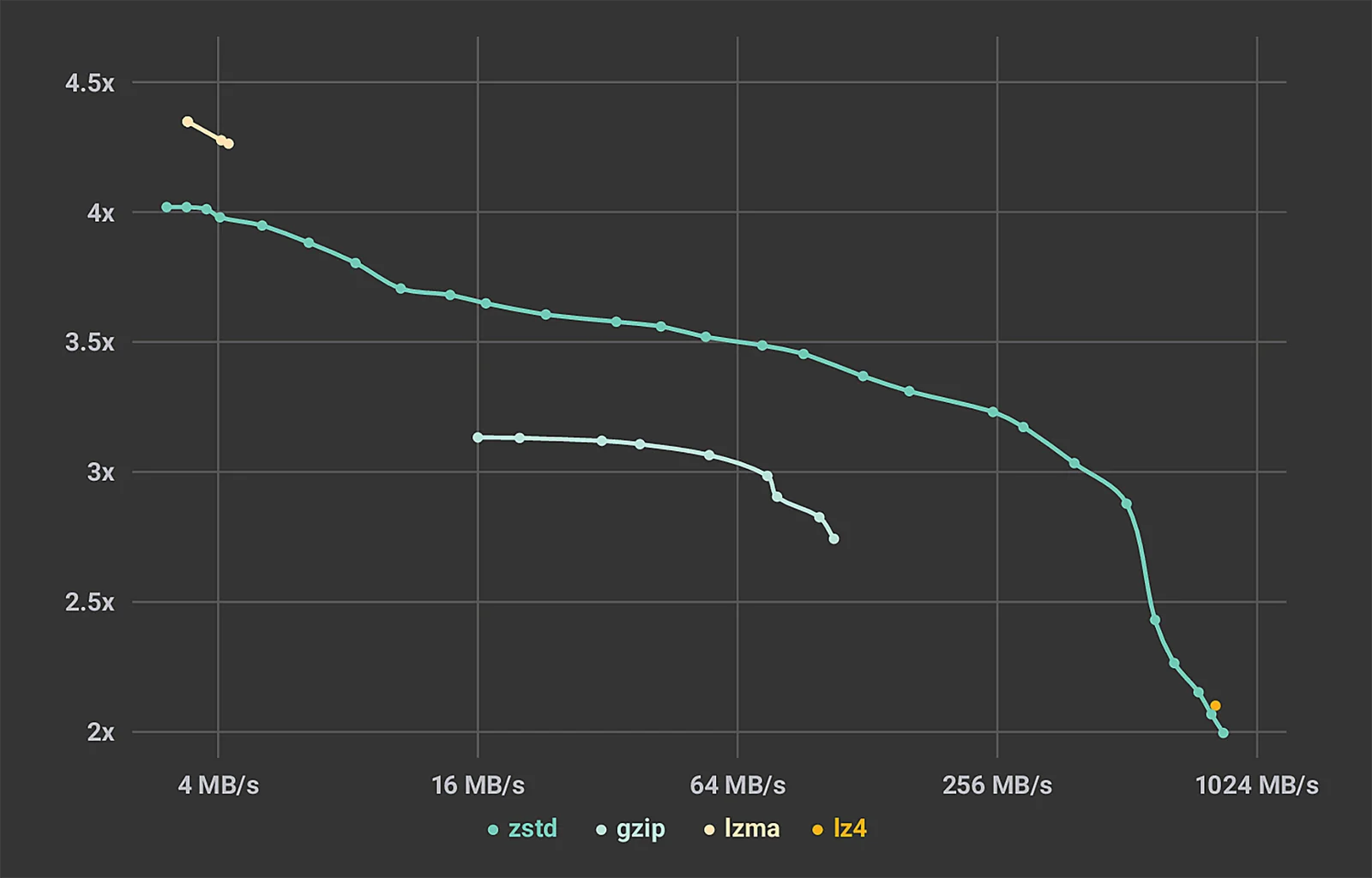
The output places encoding and decoding cost beside size. The publisher’s historical cover chart does not predict this file’s result. Re-measure after changing data, hardware or library version and verify consumer compatibility before adopting the format.
Bound resources and keep recovery compatible
Before changing an archive format, verify that downstream tools and emergency recovery procedures can read it. Ship a small fixture and recovery instructions with the data contract. Keep an intentional transition plan rather than surprising consumers with an unreadable export.
Implementation checklist
- Verify the target Python build supports the module.
- Round-trip representative data.
- Measure time and memory alongside size.
- Bound resources when handling untrusted input.
References
Editorial guidance: Liyan Knowledge.